Bubble Sort Example in JAVA


package in.malliktalksjava;

/**
* @author malliktalksjava
*
*/
public class BubbleSortExample {

private static int[] input = { 4, 2, 9, 6, 23, 11, 44, 0 };

public static void bubbleSort(int arr[]) {
 int count = array.length;
 int var;
 for (int i = count; i >= 0; i--) {
   for (int j = 0; j  array[j+1]) {
          swapNumbers(temp2, var, array);
      }
   }
 printNumbers(array);
 }
}

private static void swapNumbers(int var1, int var2, int[] array) {
   int temp = array[var1];
   array[var1] = array[var2];
   array[var2] = temp;
}

private static void printNumbers(int[] input) {
  for (int i = 0; i < input.length; i++) {
    System.out.println(input[i] + ", ");
  }
}
}

Other Useful Links:

Selection Sort Example Program in JAVA

Insertion Sort Example program in JAVA

Quick Sort Example Program in Java

Merge Sort Example in Java

Javac/Java searching algorithm for other classes


With this post, I would like to explain how exactly the Java/Java will search for its dependencies in the project or application level. Java Applications can be run using the command line or in the Web/Application servers. For both the scenarios will be covered as below:

When you are accessing standalone application using command prompt, below will be the search criteria steps:

Step 1: The first place that look in the directories that contains the classes that come with Java SE.

Step 2: The classpath that declared as command line options for either Java/Javac. Since the classpath declared in command line options override the classpath declared in command line options persists only for the length of the invocation.

Step 3: Looks for the the default classpath that declared as System Environment Variables.

When you are accessing the application from Web or application servers, below will be the search criteria steps:

Step 1: The first place that look in the directories that contains the classes that come with Java SE.

Step 2: If the dependencies not able to identify in the JRE lib folder, then it will be looked into the Application lib folder.

Step 3: If the dependencies not able to fine in above two steps, then it will be looked into Web/App server lib folder.


Other Useful Links:

Differences between Object and Instance
Difference between Abstract Class and Interface:
Threads Interview questions in Java
Access Specifiers in Java
Avoid nested loops using Collection Framework in Java

Example program to reverse a Number in Java


package in.javatutorials;

public class ReverseNumber {

public static void main(String[] args) {
System.out.println(“The reversed number is ” + reverse(1234));
}

public static int reverse(int input) {
int result = 0;
int rem;
while (input > 0) {
rem = input % 10;
input = input / 10;
result = result * 10 + rem;
}
return result;
}
}


How to find count of duplicates in a List


There are many different ways to find out the duplicates in a List or count of duplicates in a List object. Three best ways have been implemented in the below sample class. I suggest to go with 2nd sample, when there is a requirement in your project.

package in.javatutorials;

import java.util.ArrayList;
import java.util.Collections;
import java.util.HashMap;
import java.util.HashSet;
import java.util.List;
import java.util.Map;
import java.util.Set;

public class CountOfDuplicatesInList {

public static void main(String[] args) {

List<String> list = new ArrayList<String>();
list.add(“a”);
list.add(“b”);
list.add(“c”);
list.add(“d”);
list.add(“b”);
list.add(“c”);
list.add(“a”);
list.add(“a”);
list.add(“a”);

// Find out the count of duplicates by passing a String – static way
System.out.println(“\n Output 1 – Count ‘a’ with frequency”);
System.out.println(“a : ” + Collections.frequency(list, “a”));

// Find out the count of duplicates using Unique values – dynamic way
System.out.println(“\n Output 2 – Count all with frequency”);
Set<String> uniqueSet = new HashSet<String>(list);
for (String temp : uniqueSet) {
System.out.println(temp + “: ” + Collections.frequency(list, temp));
}

// Find out the count of duplicates using Map – Lengthy process
System.out.println(“\n Output 3 – Count all with Map”);
Map<String, Integer> map = new HashMap<String, Integer>();

for (String temp : list) {
Integer count = map.get(temp);
map.put(temp, (count == null) ? 1 : count + 1);
}
for (Map.Entry<String, Integer> entry : map.entrySet()) {
System.out.println(“Key : ” + entry.getKey() + ” Value : ”
+ entry.getValue());
}
}
}


Other Useful Links:

Avoid nested loops using Collection Framework in Java

Replace special characters in a String using java

Singleton Design pattern in JAVA

Convert Array to Vector in Java

How to Copy an Array into Another Array in Java

Tips to follow while doing java code

Multi-Threading Interview questions


Thread concept is the most important topic for all the interviews. This post contains most important interview questions on Thread concepts. The answers for these questions will be covered in further posts.

  1. What is a thread ? What are the ways we have in Java to create a thread ?
  2. Write a program to create a thread using Thread class or Runnable interface.
  3. Which is the default thread that runs in every java program internally ?
  4. What is the difference between extends Thread or implements Runnable ? Which one is more useful.
  5. What is thread deadlock? Describe it.
  6. Which methods are used in thread communication.
  7. How can you set priorities to a thread ? And, what is the default priority number of a thread ?
  8. What is a Thread Scheduler ?
  9. What is a Daemon Thread ?
  10. What id thread life cycle ? Explain.
  11. How can you improve communication between two threads?
  12. What is ThreadGroup ? What are the benefits of ThreadGroup ?
  13. What is the difference between Process and Thread ?
  14. What is the difference between notify() and notifyAll() methods ?
  15. Explain some of the methods in Thread class.

Access Specifiers in Java


An access specifier is a keyword that specifies how to access or read the members of a class or the class itself.

There are four access specifiers in Java as mentioned below:

  1. private
  2. public
  3. protected
  4. default

1. Private : Private members of a class are not accessible in other class either in the same package or in another package. The scope of private specifier is class scope.

2. Public : Public members of a class are accessible any where in the same package or another package. The scope of public specifier is Global.

3.Protected : Protected members are available in the same package. They are not available in the class of another package. You can access the protected members in sub class of same package or another package.

4. Default : Default members are available in the class of same package but they are not available in another package. The scope of default specifier is Package level.

Other Useful Links:

Avoid nested loops using Collection Framework in Java

Replace special characters in a String using java

Singleton Design pattern in JAVA

Convert Array to Vector in Java

Marker or Tag Interface in Java

equals() and hashCode() methods of Object Class

Difference between Iterator and ListIterator

Inner classes in Java

Difference between Abstract Class and Interface:

Avoid nested loops using Collection Framework in Java


High performance is essential for any software implemented in any programming language. And, loops plays major role in this regard. This post explains how to avoid the loops using Java’s Collection framework.

Below are the two Java programs to understand how the performance could be increased using the Collection framework.

Using nested loops

package in.javatutorials;

/**
* Finds out the Duplicates is String Array using Nested Loops.
*/
public class UsingNesteadLoops {
  private static String[] strArray = { "Cat", "Dog", "Tiger",     "Lion", "Lion" };

  public static void main(String[] args) {
   isThereDuplicateUsingLoops(strArray);
  }

  /**
   * Iterates the String array and finds out the duplicates 
   */
   public static void isThereDuplicateUsingLoops(String[]     strArray) {

   boolean duplicateFound = false;
   int loopCounter = 0;

   for (int i = 0; i < strArray.length; i++) {
   String str = strArray[i];
   int countDuplicate = 0;

   for (int j = 0; j < strArray.length; j++) {
      String str2 = strArray[j];
      if (str.equalsIgnoreCase(str2)) {
         countDuplicate++;
      }
      if (countDuplicate > 1) {
         duplicateFound = true;
         System.out.println("Duplicates Found for " + str);
      }
      loopCounter++;
   }// end of inner nested for loop

   if (duplicateFound) {
    break;
   }
}// end of outer for loop

System.out.println("Looped " + loopCounter + " times to find the result");
}

}

If we run the above program, it will be looped 20 times to find out the duplicates in the string array which has the length of 5. Number of loops increases exponentially depending on size of array, hence the performance takes a hit. These are not acceptable to use in applications which require high performance.

Without using nested loops

package in.javatutorials;

import java.util.HashSet;
import java.util.Set;

/**
* Finds out the Duplicates is String Array using Collection.
*/
public class AvoidNesteadLoopsUsingCollections {

private static String[] strArray = { "Cat", "Dog", "Tiger", "Lion", "Lion" };

public static void main(String[] args) {
 isThereDuplicateUsingSet(strArray);
}

/**
* Iterates the String array and finds out the duplicates
*/
public static void isThereDuplicateUsingSet(String[] strArray) {
  boolean duplicateFound = false;
  int loopCounter = 0;
  Set setValues = new HashSet();

  for (int i = 0; i < strArray.length; i++) {
    String str = strArray[i];

    if(setValues.contains(str)){
        duplicateFound = true;
        System.out.println("Duplicates Found for " + str);
    }
    setValues.add(str);
    loopCounter++;

    if (duplicateFound) {
       break;
    }
   }// end of for loop

   System.out.println("Looped " + loopCounter + " times to find the result");
 }

}
  • Above approach takes only 5 loops to identify the duplicates in the same array.
  • It is more readable , easier to maintain and performs better.
  • If you have an array with 1000 items, then nested loops will loop through 999000 times and utilizing a collection will loop through only 1000 times.

Other Useful links:

Difference between sorted and ordered collection in hibernate


Below are the differences between Sorted collection and Ordered collection in Hibernate.

sorted collection 

order collection 

A sorted collection is sorting a collection by utilizing the sorting features provided by the Java collections framework. The sorting occurs in the memory of JVM which running Hibernate, after the data being read from database using java comparator. Order collection is sorting a collection by specifying the order-by clause for sorting this collection when retrieval.
If your collection is not large, it will be more efficient way to sort it. If your collection is very large, it will be more efficient way to sort it .


Other Useful Links:

Caching in Hibernate

Hibernate Interview Questions

Advantages of Hibernate over jdbc

Create a Java web service using top down approch


In the bottom up approach, we will write the java class and generates the WSDL file and other dependent components. The same will be deployed into the web containers.

In Top down approach, Architects will write the WSDL file based on the requirements. Developer need to make the corresponding service implementation using the WSDL provided. This post will explain how to create a service using the WSDL file.

Step 1: Create a dynamic or java project as mentioned here

Here, I have created a sample web dynamic project with the name SampleWS as given below.
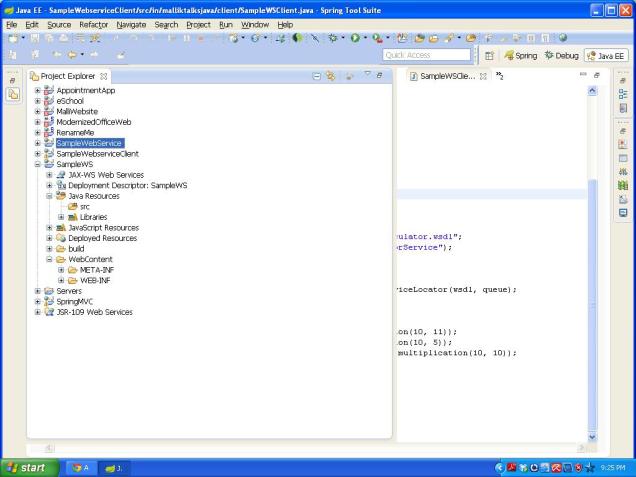
Dyanmic web project

Step 2: generate the service using top down approach

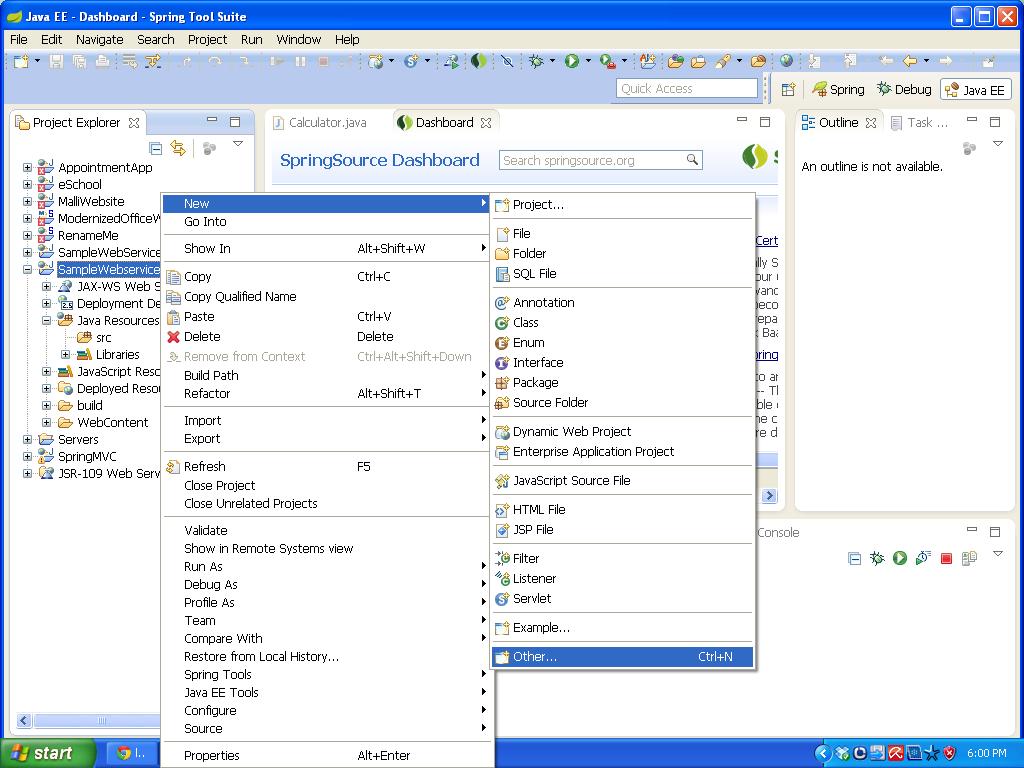
Right click on the SamplWS project name -> New -> Other
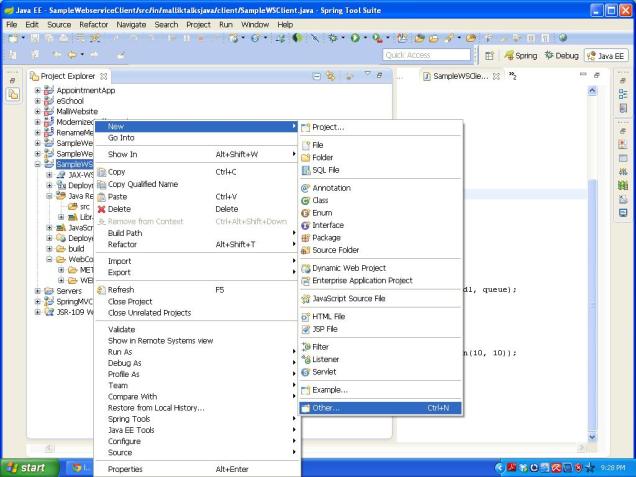
SelectOther

Select the Web Service from the wizard as below and click on Finish button.
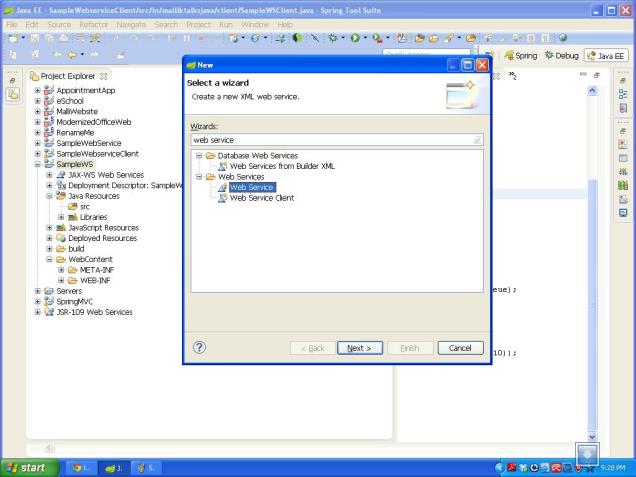
select webservice

Select the Web service type as ‘Top down Java bean Web service’ and provide the WSDL url in the Service definition drop down and click on Finish button.

Sample WSDL URL is: http://localhost:8080/SampleWebService/wsdl/Calculator.wsdl
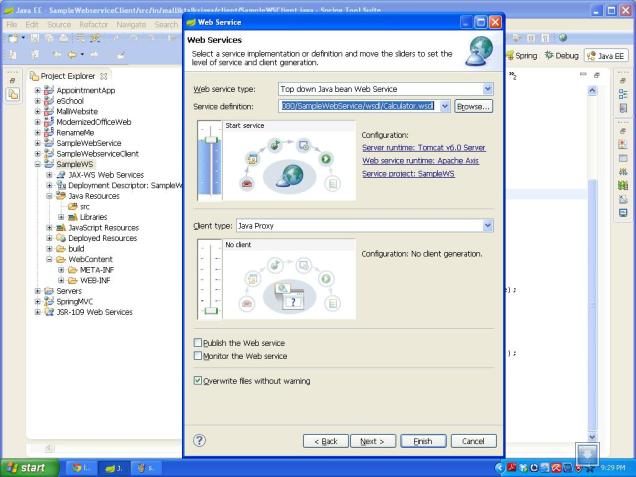
providethewsdl

Your Web service is ready with the Java bean methods as below and the Final folder structure looks like below:
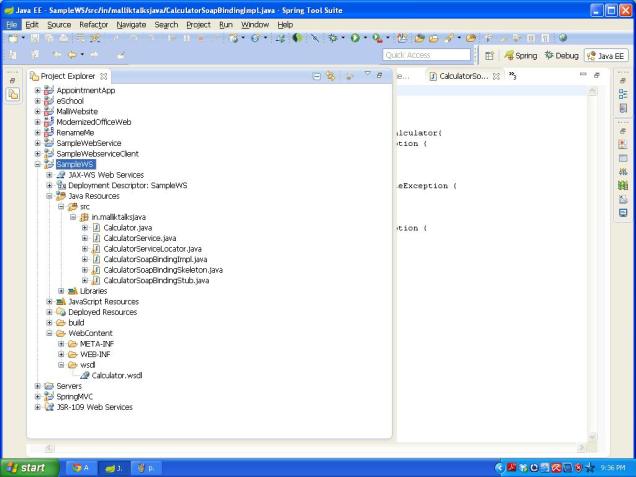
service Folder structure

Write the business logic into the Service class as given below:

Generated class:

/**
* CalculatorSoapBindingImpl.java
*
* This file was auto-generated from WSDL
* by the Apache Axis 1.4 Apr 22, 2006 (06:55:48 PDT) WSDL2Java emitter.
*/

package in.malliktalksjava;

public class CalculatorSoapBindingImpl implements in.malliktalksjava.Calculator{
public int addition(int var1, int var2) throws java.rmi.RemoteException {
return -3;
}

public int multiplication(int var1, int var2) throws java.rmi.RemoteException {
return -3;
}

public int division(int var1, int var2) throws java.rmi.RemoteException {
return -3;
}

}

Implemented class:

/**
* CalculatorSoapBindingImpl.java
*
* This file was auto-generated from WSDL
* by the Apache Axis 1.4 Apr 22, 2006 (06:55:48 PDT) WSDL2Java emitter.
*/

package in.malliktalksjava;

public class CalculatorSoapBindingImpl implements in.malliktalksjava.Calculator{
public int addition(int var1, int var2) throws java.rmi.RemoteException {
return var1+var2;
}

public int multiplication(int var1, int var2) throws java.rmi.RemoteException {
return var1*var2;
}

public int division(int var1, int var2) throws java.rmi.RemoteException {
return var1/var2;
}

}

Deploy the application into server and use the below url as a WSDL for this to have the client.

http://localhost:8080/SampleWebService/wsdl/Calculator.wsdl


Other Useful Links:

 Click here to know more about webservices

Click here to know more about RESTfull web services.

Click here for Web services Question and Answers.

Click here to know how to write web service client suing java.

Write a Client for web service


Below steps explains how to write a web service client in java using STS IDE.

Step 1: Create a Java project using the steps mentioned here.

Step 2: Generate the stubs for the Java web service using below steps

Mouse Right click on Client project and select New -> Other

select other option

Select the Web service client from the wizard

Select webservice cliet

Provide the service WSDL url in the Service Definition text box and click on finish button.

Enterwsdl into service defination

Web service client stubs will be generated into the package and final folder structure looks below.

Client stubs generated

Write the Client class using the stubs and test the client project.

Write a client


Use the below sample code to write the client:


package in.malliktalksjava.client;

import java.rmi.RemoteException;

import in.malliktalksjava.Calculator;
import in.malliktalksjava.CalculatorServiceLocator;
import javax.xml.namespace.QName;
import javax.xml.rpc.ServiceException;

/**
* @author Javatutorials
* @since version 1.0
*
*/
public class SampleWSClient {

/**
* @param args
*/
public static void main(String[] args) {

SampleWSClient sc = new SampleWSClient();
sc.callCalculatorWebservice();
}

/**
* used to call web service
*/
public void callCalculatorWebservice(){

String wsdl = “http://localhost:8080/SampleWebService/wsdl/Calculator.wsdl&#8221;;
QName queue = new QName(“http://malliktalksjava.in&#8221;, “CalculatorService”);

try {
//create the servicelocator object
CalculatorServiceLocator calServiceLoc = new CalculatorServiceLocator(wsdl, queue);
//create the service object
Calculator calculator = calServiceLoc.getCalculator();
//call the service methods
System.out.println(“addition result : “+calculator.addition(10, 11));
System.out.println(“division result : “+calculator.division(10, 5));
System.out.println(“multiplication result : “+calculator.multiplication(10, 10));
} catch (ServiceException e) {
e.printStackTrace();
} catch (RemoteException e) {
e.printStackTrace();
}
}
}


With this your client application is ready to use.


Other Useful links:

Click here to know how to create the web service project.

Click here to know the difference between SOAP and RESTfull web services.