JDBC Type Driver connection for MS SQL Server


Below is the sample program to connect to MS SQL Sever using JDBC type 4 driver:

package in.javatutorials;

import java.sql.Connection;
import java.sql.DriverManager;
import java.sql.SQLException;

/**
* @author JavaTutorials.in
*
*/
public class MSSqlDBConnection {

/**
* initialize the connection object
*/
private static Connection connection = null;

/**
* Create the database connection and return the same
*
* @return connection Connection
*/
public static Connection getDbConnection() {

// if required, below variables can be read from properties file
String username = "sqlusr";
String password = "sqlpasswrd";
String connStr = "jdbc:sqlserver://:1433;instanceName=SQLEXPRESS;databaseName=test";
try {
Class.forName("com.microsoft.sqlserver.jdbc.SQLServerDriver");

connection = DriverManager.getConnection(connStr, username,
password);
} catch (ClassNotFoundException classNotFoundExcep) {
classNotFoundExcep.printStackTrace();
} catch (SQLException sqlExcep) {
sqlExcep.printStackTrace();
}
return connection;
}

/**
* Close the connection if exists, this method can be called once
* transaction is completed, so that it will close the connection
*/
public static void closeConnection() {
if (connection != null) {
try {
connection.close();
} catch (SQLException sqlExcep) {
sqlExcep.printStackTrace();
}
}
}

public static void main(String[] args) {
System.out.println("Print the Database conn object : "
+ getDbConnection());
}
}

Top Java script Charting Frameworks


Building Business Intelligence applications is always require the lot of effort and time. As all already might aware of that the Charting applications comes under the business intelligence applications.

There are many number of java charting frame works are available in the market. Some of them might be opensource, some of them are freeware and others might be premium based frameworks. As per my opinion, implementing the charting applications using java based frameworks takes lot of time and bringing good look and feel is night mare to developers.

In this post, I am planning to put some points about the Java script based charting libraries. If you feel interesting about this, just learn more details in the particular websites.

  • FusionCharts Suite XT: You can build delightful JavaScript charts for web and mobile applications. Charts will be rendered in JavaScript (HTML5) Charts using SVG and VML. It accepts the JSON and XML are the input parameters. You can integrate with the JQuery library. It also provides the API for serviside integration for ASP.NET, PHP, ASP, Java, Ruby on Rails etc. It supports zooming, scrolling and pinning. Provides 90+ chart types in both 2D and 3D. Its a licensed and paid library for production environment.
  • HighCharts : Interactive JavaScript charts for your web projects. These charts will be rendered in JavaScript (HTML5) Charts using SVG and VML. It accepts the JSON as input format. It provides only 2D format charts. It supports zooming and panning support. Its paid for commercial usage and Non-commercial usage is free. It supports 25+ chart types in 2D. Maps and 3D charts are not supported.
  • Google Chart Tools: Google Chart tools display live data on your site. These charts will be rendered in HTML5 charts using SVG and VML. It is free library for all usages. The JavaScript files are loaded directly from Google’s servers. So your application always has to be online to view the charts. 13 chart types in 2D. Maps available as GeoChart.
  • Sencha ExtJS Charts: This is Plugin-free Charting (part of the extJS framework). These charts will be rendered in JavaScript Charts using SVG and VML. It doesn’t supports zooming or panning. 13 chart types in 2D. Maps and 3D charts not supported.
  • Chart.js:It is a easy, object oriented client side graphs for designers and developers. Its a Canvas based charts. It is Free under MIT license. The charts are drawn using Canvas and hence cannot offer any interactivity. 6 chart types are available.
  • Flot: It is an attractive JavaScript plotting for jQuery. It renders in the charts in the form of HTML5 charts using Canvas and VML. It provides 8 chart types in 2D. Maps and 3D charts not supported.Its a free library.
  • jqPlot: It is a Versatile and Expandable jQuery Plotting Plugin and renders in HTML5 charts using Canvas. Ability to provide the 25+ chart types in 2D. Maps and 3D charts not supported. It can be used under GPL and MIT licences. Supports Quintile Pyramid Charts, Engel & Lorenz Curves, Multi-level pie, Block plots.
  • amCharts: It is a Robust JavaScript Charting Tool / Interactive JavaScript Charts. It renders the charts in the format of JavaScript (HTML5) Charts using SVG and VML. It provides the 18 chart types in 2D and 3D. Maps available as part of amMaps package. Only can be used with the paid licence. Support for PDF not available. Zooming and panning support is available.
  • gRaphaël: You can build stunning charts on your website. It renders the charts in the format of JavaScript (HTML5) Charts using SVG and VML. Supports 4 chart types in 2D. Maps and 3D charts are not supported. It can be used under MIT licence. No support for zooming or panning. Provides the Dot Charts.

Understanding of complete libraries helps us in taking a decision before designing the applications. Lets be let me know your inputs on this post.

Source: http://www.fusioncharts.com/javascript-charting-comparison/?utm_source=Competitor-Mailer&utm_medium=email&utm_content=Main-C2A&utm_campaign=GrownUps

Other Useful links:

List of Java script MVC Frameworks

Enabling javascript in browsers

Decimal Validation in JavaScript

Creation of Dynamic rows in javascript

Conversion of string into uppercase

Avoid nested loops using Collection Framework in Java


High performance is essential for any software implemented in any programming language. And, loops plays major role in this regard. This post explains how to avoid the loops using Java’s Collection framework.

Below are the two Java programs to understand how the performance could be increased using the Collection framework.

Using nested loops

package in.javatutorials;

/**
* Finds out the Duplicates is String Array using Nested Loops.
*/
public class UsingNesteadLoops {
  private static String[] strArray = { "Cat", "Dog", "Tiger",     "Lion", "Lion" };

  public static void main(String[] args) {
   isThereDuplicateUsingLoops(strArray);
  }

  /**
   * Iterates the String array and finds out the duplicates 
   */
   public static void isThereDuplicateUsingLoops(String[]     strArray) {

   boolean duplicateFound = false;
   int loopCounter = 0;

   for (int i = 0; i < strArray.length; i++) {
   String str = strArray[i];
   int countDuplicate = 0;

   for (int j = 0; j < strArray.length; j++) {
      String str2 = strArray[j];
      if (str.equalsIgnoreCase(str2)) {
         countDuplicate++;
      }
      if (countDuplicate > 1) {
         duplicateFound = true;
         System.out.println("Duplicates Found for " + str);
      }
      loopCounter++;
   }// end of inner nested for loop

   if (duplicateFound) {
    break;
   }
}// end of outer for loop

System.out.println("Looped " + loopCounter + " times to find the result");
}

}

If we run the above program, it will be looped 20 times to find out the duplicates in the string array which has the length of 5. Number of loops increases exponentially depending on size of array, hence the performance takes a hit. These are not acceptable to use in applications which require high performance.

Without using nested loops

package in.javatutorials;

import java.util.HashSet;
import java.util.Set;

/**
* Finds out the Duplicates is String Array using Collection.
*/
public class AvoidNesteadLoopsUsingCollections {

private static String[] strArray = { "Cat", "Dog", "Tiger", "Lion", "Lion" };

public static void main(String[] args) {
 isThereDuplicateUsingSet(strArray);
}

/**
* Iterates the String array and finds out the duplicates
*/
public static void isThereDuplicateUsingSet(String[] strArray) {
  boolean duplicateFound = false;
  int loopCounter = 0;
  Set setValues = new HashSet();

  for (int i = 0; i < strArray.length; i++) {
    String str = strArray[i];

    if(setValues.contains(str)){
        duplicateFound = true;
        System.out.println("Duplicates Found for " + str);
    }
    setValues.add(str);
    loopCounter++;

    if (duplicateFound) {
       break;
    }
   }// end of for loop

   System.out.println("Looped " + loopCounter + " times to find the result");
 }

}
  • Above approach takes only 5 loops to identify the duplicates in the same array.
  • It is more readable , easier to maintain and performs better.
  • If you have an array with 1000 items, then nested loops will loop through 999000 times and utilizing a collection will loop through only 1000 times.

Other Useful links:

List of Java script MVC Frameworks


While the Internet is growing up, more demand for Rich Internet applications is growing proportionally. The end user always expecting have the best look and feel, at the same time expecting the larger functionalities with the minor actions made on the application pages.

Java script plays the major role in achieving these goals. When the more logic ends up being executed in the browser, JavaScript front-end code bases grow larger and more difficult to maintain. The way to solve this issue, developers have been turning to MVC frameworks which promise increased productivity and maintainable code.

There are many MVC based java script frameworks have been came into opensource market in the last decade, which helps the developer to build the Rich Internet Applications easy.

Listed below are the few MVC based java script frameworks.

  • ExtJS: Provides powerful big data grids, a modern theme, and plugin-free charting apart from the basic functionalities.Backbone.js: Provides models with key-value binding and custom events, collections, and connects it all to your existing API over a RESTful JSON interface.
  • AngularJS: AngularJS is provide by the Google into internet market. It is a toolset based on extending the HTML vocabulary for your application. It is 100% JavaScript, 100% client side and compatible with both desktop and mobile browsers.
  • Ember.js: As stated on the Ember.js website, Ember.js is “a JavaScript framework for creating ambitious web applications that eliminates boilerplate and provides a standard application architecture”. Provides template written in the Handlebars templating language, views, controllers, models and a router.
  • Knockout: It aims to simplify JavaScript UIs by applying the Model-View-View Model (MVVM) pattern.
  • Agility.js: Using Agility JS, you can write maintainable and reusable browser code without the verbose or infrastructural overhead found in other MVC libraries.
  • CanJS: Focuses on striking a balance between size, ease of use, safety, speed and flexibility. CanJS’s core supports jQuery, Zepto, Dojo, YUI and Mootools.
  • Spine: Spine js a lightweight framework that strives to have the most friendly documentation for any JavaScript framework available.
  • ExtJS: Provides powerful big data grids, a modern theme, and plugin-free charting apart from the basic functionalities.
  • Sammy.js: A small JavaScript framework developed to provide a basic structure for developing JavaScript applications.
  • rAppid.js: Lets you encapsulate complexity into components which can be easy used like HTML elements in your application. It uses a Shadow DOM, which is rendered as valid HTML in the document body or a specific target.
  • Serenade.js: Define templates and render them, handing in a controller and a model to the template. It will get the values from the model and update them dynamically as the model changes. It can be integrated into an existing applications, it plays well with all existing JavaScript code.
  • Kendo UI: Contains the rich jQuery-based widgets, a simple and consistent programming interface, a rock-solid DataSource, validation, internationalization, a MVVM framework, themes, templates and etc.

Advantages of Hibernate over jdbc?


Below are the advantages of Hibernate over JDBC:

JDBC 

Hibernate 

With JDBC, developer has to write code to map an object model’s data representation to a relational data model and its corresponding database schema. Hibernate is flexible and powerful ORM solution to map Java classes to database tables. Hibernate itself takes care of this mapping using XML files so developer does not need to write code for this.
With JDBC, the automatic mapping of Java objects with database tables and vice versa conversion is to be taken care of by the developer manually with lines of code. Hibernate provides transparent persistence and developer does not need to write code explicitly to map database tables tuples to application objects during interaction with RDBMS.
JDBC supports only native Structured Query Language (SQL). Developer has to find out the efficient way to access database, i.e. to select effective query from a number of queries to perform same task. Hibernate provides a powerful query language Hibernate Query Language (independent from type of database) that is expressed in a familiar SQL like syntax and includes full support for polymorphic queries. Hibernate also supports native SQL statements. It also selects an effective way to perform a database manipulation task for an application.
Application using JDBC to handle persistent data (database tables) having database specific code in large amount. The code written to map table data to application objects and vice versa is actually to map table fields to object properties. As table changed or database changed then it’s essential to change object structure as well as to change code written to map table-to-object/object-to-table. Hibernate provides this mapping itself. The actual mapping between tables and application objects is done in XML files. If there is change in Database or in any table then the only need to change XML file properties.
With JDBC, it is developer’s responsibility to handle JDBC result set and convert it to Java objects through code to use this persistent data in application. So with JDBC, mapping between Java objects and database tables is done manually. Hibernate reduces lines of code by maintaining object-table mapping itself and returns result to application in form of Java objects. It relieves programmer from manual handling of persistent data, hence reducing the development time and maintenance cost.
With JDBC, caching is maintained by hand-coding. Hibernate, with Transparent Persistence, cache is set to application work space. Relational tuples are moved to this cache as a result of query. It improves performance if client application reads same data many times for same write. Automatic Transparent Persistence allows the developer to concentrate more on business logic rather than this application code.
In JDBC there is no check that always every user has updated data. This check has to be added by the developer. Hibernate enables developer to define version type field to application, due to this defined field Hibernate updates version field of database table every time relational tuple is updated in form of Java class object to that table. So if two users retrieve same tuple and then modify it and one user save this modified tuple to database, version is automatically updated for this tuple by Hibernate. When other user tries to save updated tuple to database then it does not allow saving it because this user does not have updated data.

Other Useful Links:

Caching in Hibernate

Hibernate Interview Questions

Difference between sorted and ordered collection in hibernate

Difference between sorted and ordered collection in hibernate


Below are the differences between Sorted collection and Ordered collection in Hibernate.

sorted collection 

order collection 

A sorted collection is sorting a collection by utilizing the sorting features provided by the Java collections framework. The sorting occurs in the memory of JVM which running Hibernate, after the data being read from database using java comparator. Order collection is sorting a collection by specifying the order-by clause for sorting this collection when retrieval.
If your collection is not large, it will be more efficient way to sort it. If your collection is very large, it will be more efficient way to sort it .


Other Useful Links:

Caching in Hibernate

Hibernate Interview Questions

Advantages of Hibernate over jdbc

Create a Java web service using top down approch


In the bottom up approach, we will write the java class and generates the WSDL file and other dependent components. The same will be deployed into the web containers.

In Top down approach, Architects will write the WSDL file based on the requirements. Developer need to make the corresponding service implementation using the WSDL provided. This post will explain how to create a service using the WSDL file.

Step 1: Create a dynamic or java project as mentioned here

Here, I have created a sample web dynamic project with the name SampleWS as given below.

Dyanmic web project

Step 2: generate the service using top down approach

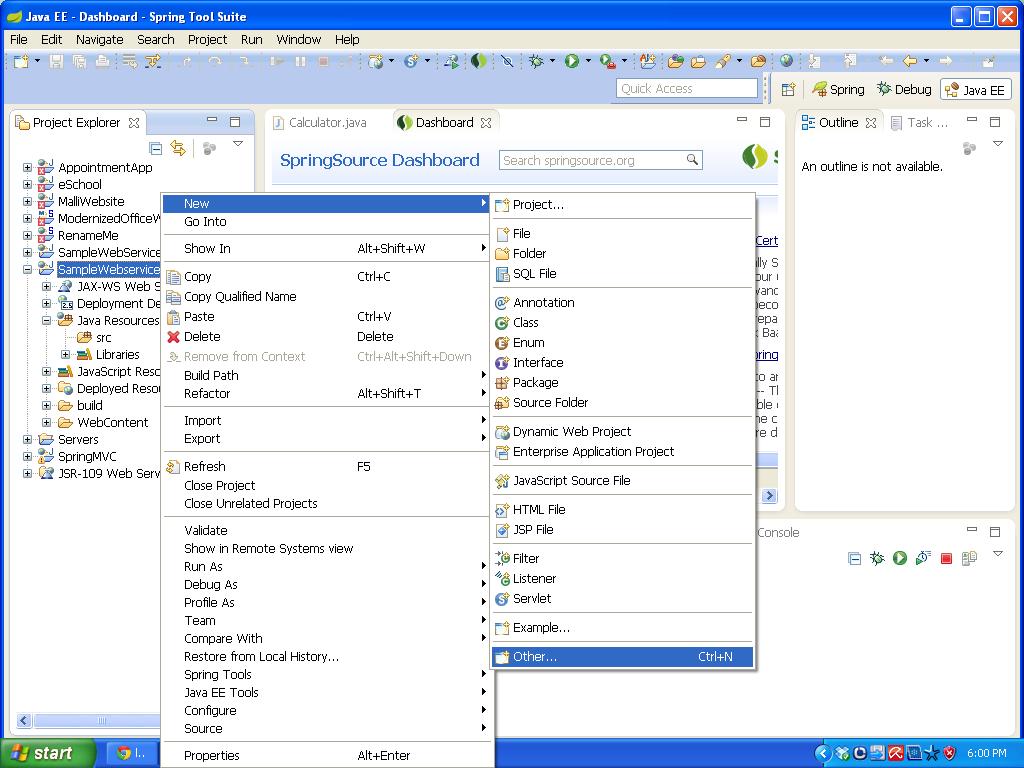
Right click on the SamplWS project name -> New -> Other

SelectOther

Select the Web Service from the wizard as below and click on Finish button.

select webservice

Select the Web service type as ‘Top down Java bean Web service’ and provide the WSDL url in the Service definition drop down and click on Finish button.

Sample WSDL URL is: http://localhost:8080/SampleWebService/wsdl/Calculator.wsdl

providethewsdl

Your Web service is ready with the Java bean methods as below and the Final folder structure looks like below:

service Folder structure

Write the business logic into the Service class as given below:

Generated class:

/**
* CalculatorSoapBindingImpl.java
*
* This file was auto-generated from WSDL
* by the Apache Axis 1.4 Apr 22, 2006 (06:55:48 PDT) WSDL2Java emitter.
*/

package in.malliktalksjava;

public class CalculatorSoapBindingImpl implements in.malliktalksjava.Calculator{
public int addition(int var1, int var2) throws java.rmi.RemoteException {
return -3;
}

public int multiplication(int var1, int var2) throws java.rmi.RemoteException {
return -3;
}

public int division(int var1, int var2) throws java.rmi.RemoteException {
return -3;
}

}

Implemented class:

/**
* CalculatorSoapBindingImpl.java
*
* This file was auto-generated from WSDL
* by the Apache Axis 1.4 Apr 22, 2006 (06:55:48 PDT) WSDL2Java emitter.
*/

package in.malliktalksjava;

public class CalculatorSoapBindingImpl implements in.malliktalksjava.Calculator{
public int addition(int var1, int var2) throws java.rmi.RemoteException {
return var1+var2;
}

public int multiplication(int var1, int var2) throws java.rmi.RemoteException {
return var1*var2;
}

public int division(int var1, int var2) throws java.rmi.RemoteException {
return var1/var2;
}

}

Deploy the application into server and use the below url as a WSDL for this to have the client.

http://localhost:8080/SampleWebService/wsdl/Calculator.wsdl


Other Useful Links:

 Click here to know more about webservices

Click here to know more about RESTfull web services.

Click here for Web services Question and Answers.

Click here to know how to write web service client suing java.

Write a Client for web service


Below steps explains how to write a web service client in java using STS IDE.

Step 1: Create a Java project using the steps mentioned here.

Step 2: Generate the stubs for the Java web service using below steps

Mouse Right click on Client project and select New -> Other

select other option

Select the Web service client from the wizard

Select webservice cliet

Provide the service WSDL url in the Service Definition text box and click on finish button.

Enterwsdl into service defination

Web service client stubs will be generated into the package and final folder structure looks below.

Client stubs generated

Write the Client class using the stubs and test the client project.

Write a client


Use the below sample code to write the client:


package in.malliktalksjava.client;

import java.rmi.RemoteException;

import in.malliktalksjava.Calculator;
import in.malliktalksjava.CalculatorServiceLocator;
import javax.xml.namespace.QName;
import javax.xml.rpc.ServiceException;

/**
* @author Javatutorials
* @since version 1.0
*
*/
public class SampleWSClient {

/**
* @param args
*/
public static void main(String[] args) {

SampleWSClient sc = new SampleWSClient();
sc.callCalculatorWebservice();
}

/**
* used to call web service
*/
public void callCalculatorWebservice(){

String wsdl = “http://localhost:8080/SampleWebService/wsdl/Calculator.wsdl&#8221;;
QName queue = new QName(“http://malliktalksjava.in&#8221;, “CalculatorService”);

try {
//create the servicelocator object
CalculatorServiceLocator calServiceLoc = new CalculatorServiceLocator(wsdl, queue);
//create the service object
Calculator calculator = calServiceLoc.getCalculator();
//call the service methods
System.out.println(“addition result : “+calculator.addition(10, 11));
System.out.println(“division result : “+calculator.division(10, 5));
System.out.println(“multiplication result : “+calculator.multiplication(10, 10));
} catch (ServiceException e) {
e.printStackTrace();
} catch (RemoteException e) {
e.printStackTrace();
}
}
}


With this your client application is ready to use.


Other Useful links:

Click here to know how to create the web service project.

Click here to know the difference between SOAP and RESTfull web services.