Example HTML File to display Overlay using JQuery


<html>
<head>
<title>Sample Overlay Test</title>
<link href=”css/jquery-ui.min.css” rel=”stylesheet” type=”text/css” />
http://js/jquery.min.js
http://js/jquery-ui.min.js

<style type=”text/css”>
#displayOverLayDiv {
width: 500px;
height: 500px;
display: none;
}

.overlay {
position: absolute;
top: 0;
left: 0;
display: none;
background-color: black;
background: url(“http://malliktalksjava.in&#8221;);
}

#frame {
border: 0;
width: 500px;
height: 500px;
}

#open {
border: 0;
width: 175px;
height: 24px;
background-color: #EAF8F8;
font-size: 18 px;
font-weight: bold;
}
</style>

<script type=”text/javascript”>
$(document).ready(function () {
$(‘#open’).click(function () {
$(“.overlay”).height($(window).height());
$(“.overlay”).width($(window).width());
$(“.overlay”).fadeTo(1000, 0.4);
$(“#displayOverLayDiv”).dialog({
width: “auto”,
height: “auto”,
show: {
effect: “slide”,
duration: 1500
},
hide: {
effect: “slide”,
duration: 1500
},
beforeClose: function () {
$(“.overlay”).fadeTo(1000, 0);
},
close: function () {
$(“.overlay”).css(“display”, “none”);
},
resizeStop: function (event, ui) {
$(“#frame”).height($(this).height());
$(“#frame”).width($(this).width());
}
});
});
});
</script>
</head>

<body>
<div id=’open’>
<a href=”#”>Click here to Get Overlay</a>
</div>
<div class=’overlay’>
<div id=’displayOverLayDiv’>

</div>
</div>
</body>
</html>


Other Useful links:

List of Java script MVC Frameworks

Enabling javascript in browsers

Decimal Validation in JavaScript

Creation of Dynamic rows in javascript

Top Javascript Charting Frameworks

Client Tools required to pre-install to access or create a new Open Shift application


I have faced hell lot of issues when I started implementing the Openshift sample application. I thought of sharing my experience with everybody so that it will help if there is any issue during others project implementation. Most important thing in accessing the application is to install the client tools in your machine.

In this post I would like to explain about the Client tools required, install the tools in to windows machine and check the installation status of the tools.

Install Client Tools:

For Windows based desktop it is required to install the three client tools as mentioned below:

1) Ruby: All open shift tools runs on the Ruby, this is the basic software that is required to install. Download suitable Ruby installer for your desktop from Ruby Down loads page and install the by accepting all default options. After the installation is completed, to verify that the installation is working run:

RubyRunningStatus

2) Git Client: Git is used to synchronize local application source and your OpenShift application. Download and install the latest version of Git for Windows. After installing the git, it is required to ensure that git is added into your system PATH. If it is not added, make sure to add it manually in system environment variables.

After installing the git, you can check the git version installed in machine using below command.

GitVersion

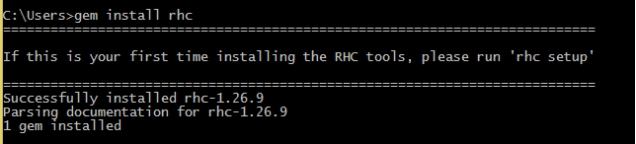
3) Openshift client: After Ruby and git installed properly, run the openshift client tools bundled in the ruby installer.

OpenshiftClinet

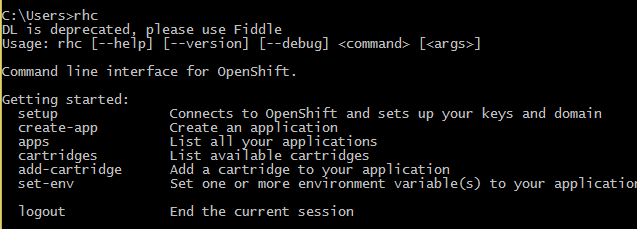
After installation completes, run the rhc command as below, then complete list of options to be displayed.

RHCOptions


Other Useful Links:

Openshift – The Open Hybrid Cloud Application Platform by Red Hat

Example Program: Search Word in Folder files and print output


To Search a word in in list of files available in Folder, you need to find the list of files first and then scan each and every for required word. Below is the sample program to find the a given word Java in D:\\test folder of files.

package in.javatutorials;

import java.io.File;
import java.io.FileNotFoundException;
import java.util.Scanner;
import java.util.regex.MatchResult;

/**
 * Search for the files in a folder and prints all file details.
 */
public class WordCrawlerInFolder {

private static String directoryPath = "D://test";
private static String searchWord = "Java";

public WordCrawlerInFolder() {
super();
}

public static void main(String[] args) {
   WordCrawlerInFolder crawler = new WordCrawlerInFolder();
    File directory = new File(directoryPath);

    if (directory == null || !directory.exists()) {
           System.out.println("Directory doesn't exists!!!");
           return;
    }
    crawler.directoryCrawler(directory, searchWord);
}

/**
* Gets all the file and directories and prints accordingly
* @param directory
* Directory path where it should search
*/
public void directoryCrawler(File directory, String searchWord) {

// Get List of files in folder and print
File[] filesAndDirs = directory.listFiles();

// Print the root directory name
//System.out.println("-" + directory.getName());

// Iterate the list of files, if it is identified as not a file call
// directoryCrawler method to list all the files in that directory.
for (File file : filesAndDirs) {

if (file.isFile()) {
searchWord(file, searchWord);
//System.out.println(" |-" + file.getName());
} else {
directoryCrawler(file, searchWord);
}
}
}

/**
* Search for word in a given file.
* @param file
* @param searchWord
*/
private void searchWord(File file, String searchWord){
Scanner scanFile;
try {
scanFile = new Scanner(file);
while (null != scanFile.findWithinHorizon("(?i)\\b"+searchWord+"\\b", 0)) {
MatchResult mr = scanFile.match();
System.out.printf("Word found : %s at index %d to %d.%n", mr.group(),
mr.start(), mr.end());
}
scanFile.close();
} catch (FileNotFoundException e) {
System.err.println("Search File Not Found !!!!! ");
e.printStackTrace();
}
}
}

We have used some escape characters in above class searchWord() method, below is the notation for the same.

  1. (?i) turn on the case-insensitive switch
  2. \b means a word boundary
  3. java is the string searched for
  4. \b a word boundary again.

If search term contain special characters, it would be suggested to use \Q and \E around the string, as it quotes all characters in between. Make sure the input doesn’t contain \E itself.

Other Useful Links:

Javac/Java searching algorithm for other classes

Example program to reverse a Number in Java

How to find count of duplicates in a List

Threads Interview questions in Java

How to Identify Browser Agent in JavaScript


Here is the Example code to identify the Browser Agent using Java script:

<script type=”text/javascript”>
alert(navigator);
var browserName=navigator.appName;
var userAgent = navigator.userAgent
alert(browserName);
if (browserName==”Microsoft Internet Explorer”){
alert(“Microsoft Internet Explorer”);
alert(“Microsoft Internet Explorer Version : “+navigator.appVersion);
alert(document.documentMode;);

}
else if (browserName==”Netscape” && userAgent.indexOf(“Chrome”) != -1 ){
alert(“Google Chrome”);
alert(“Google Chrome Version: “+navigator.appVersion);
}
else if(browserName==”Netscape” && userAgent.indexOf(“Mozilla”) != -1){
alert(“Mozilla Firefox”);
alert(“Mozilla Firefox Version : “+navigator.appVersion);
}else{
alert(“Another browser”);
}
</script>

Other Useful Links:

Top Java script Charting Frameworks

List of Java script MVC Frameworks

Enabling javascript in browsers

Creation of Dynamic rows in javascript

Example Java Program to Search Files in a Folder


Below Java Program lists the file names and directory names available in given folder. To do this implementation , we can get the files list in a folder using File class available in Java API. Iterate the files one by one and write the file name on to console.

If it is identified as a directory instead of a file, then iterate the process as mentioned in directoryCrawler() method in the below class.

package in.javatutorials;

import java.io.File;

/**
* @author malliktalksjava
*
* Search for the files in a folder and prints all file details.
*
*/
public class FolderCrawler {

private static String directoryPath = “D://test”;

/**
* Creating constructor
*/
public FolderCrawler() {
super();
}

/**
* main method
*
* @param ags
*/
public static void main(String[] args) {
FolderCrawler crawler = new FolderCrawler();

File directory = new File(directoryPath);

if (directory == null || !directory.exists()) {
System.out.println(“Directory doesn’t exists!!!”);
return;
}

crawler.directoryCrawler(directory);
}

/**
* Gets all the file and directories and prints accordingly
*
* @param directory
* Directory path where it should search
*/
public void directoryCrawler(File directory) {

// Get List of files in folder and print
File[] filesAndDirs = directory.listFiles();

// Print the root directory name
System.out.println(“-” + directory.getName());

// Iterate the list of files, if it is identified as not a file call
// directoryCrawler method to list all the files in that directory.
for (File file : filesAndDirs) {

if (file.isFile()) {
System.out.println(” |-” + file.getName());
} else {
directoryCrawler(file);

}
}// end of for

}// End of directory Crawler
}


Other Useful Links:

Javac/Java searching algorithm for other classes

Example program to reverse a Number in Java

How to find count of duplicates in a List

Threads Interview questions in Java

Openshift – The Open Hybrid Cloud Application Platform by Red Hat


When I saw about Openshift for the first time, it was kind of amazing feeling to me. When I started using it, I feelings never decreased.

It is an Open Hybrid Cloud Application Platform by Red Hat. I have looked into IDE based implementation, I have looked into command based implementation for JAVA application deployment in JBoss Enterprise application server. I felt like I have learned something new, which may change my life entirely if I become a master in that.

Hope, keep exploring about it from your side, you will definitely love it. I am sure, I have not given any mis perception on this to you.

Base Site : https://www.openshift.com

About Product : https://www.openshift.com/products

User Guide : https://access.redhat.com/site/documentation/en-US/OpenShift_Online/2.0/html/User_Guide/index.html 


I am very happy if you keep posting your comments on OpenShift, lets others know about this interesting thing. All comments are invited!!!

Thanks…


Merge Sort Example in Java


package in.malliktalksjava;

/**
* @author malliktalksjava
*
* Sorts the given array using merge sort algorithm
*/
public class MergeSortExample {

private int[] array;
private int[] tempMergArr;
private int length;

/**
* @param args
*
* main method.
* Pass the array to sort method and prints the output array into console.
*/
public static void main(String args[]){

int[] inputArr = {12,25,36,95,86,21,14,52,85,32};
MergeSortExample mergeSorter = new MergeSortExample();
mergeSorter.sort(inputArr);
for(int sortedValue:inputArr){
System.out.print(sortedValue);
System.out.print(” “);
}
}

/**
* @param inputArr
*
* Checks given array is null of not, then pass it to mergeSort Method.
*/
public void sort(int[] inputArr) {

if (inputArr == null || inputArr.length == 0) {
System.out.println(“Given Array is null or does not contain any elements”);
return;
}

this.array = inputArr;
this.length = inputArr.length;
this.tempMergArr = new int[length];
mergeSort(0, length – 1);
}

/**
* @param lowerIndex
* @param higherIndex
*
* Sorts the array using mergesort algorithm.
*/
private void mergeSort(int lowerIndex, int higherIndex) {

if (lowerIndex < higherIndex) {
int middle = lowerIndex + (higherIndex – lowerIndex) / 2;
// sort the left side of the array
mergeSort(lowerIndex, middle);
// sort the right side of the array
mergeSort(middle + 1, higherIndex);
// merge both sides
mergeParts(lowerIndex, middle, higherIndex);
}
}

/**
* @param lowerIndex
* @param middle
* @param higherIndex
*
*
*/
private void mergeParts(int lowerIndex, int middle, int higherIndex) {

for (int i = lowerIndex; i <= higherIndex; i++) {
tempMergArr[i] = array[i];
}
int i = lowerIndex;
int j = middle + 1;
int k = lowerIndex;
while (i <= middle && j <= higherIndex) {
if (tempMergArr[i] <= tempMergArr[j]) {
array[k] = tempMergArr[i];
i++;
} else {
array[k] = tempMergArr[j];
j++;
}
k++;
}
while (i <= middle) {
array[k] = tempMergArr[i];
k++;
i++;
}
}
}


Other Useful Links:

Quick Sort Example Program in Java

Insertion Sort Example program in JAVA

Selection Sort Example Program in Java

Bubble Sort Example in JAVA

Quick Sort Example Program in Java


package in.malliktalksjava;

/**
* @author malliktalksjava
*
* Sort the given array using QuickSort Algorithm
*/
public class QuickSortExample {

private int array[];
private int length;

/**
* @param args
*
* Main Method. Calls the sort method and print the output into
* console.
*/
public static void main(String args[]) {
QuickSortExample quickSorter = new QuickSortExample();
int[] input = { 15, 42, 14, 100, 85, 1, 13, 6, 9 };
quickSorter.sortArray(input);
for (int count : input) {
System.out.print(count);
System.out.print(” “);
}
}

/**
* @param inputArr
*
* Checks given array is empty or null, if not calls quickSort
* method.
*/
public void sortArray(int[] inputArr) {

if (inputArr == null || inputArr.length == 0) {
return;
}
this.array = inputArr;
length = inputArr.length;
quickSort(0, length – 1);
}

/**
* @param lowerIndex
* @param higherIndex
*
* Sorts the given array
*/
private void quickSort(int lowerIndex, int higherIndex) {

int temp1 = lowerIndex;
int temp2 = higherIndex;
// calculate pivot number, here pivot is middle index number
int pivot = array[lowerIndex + (higherIndex – lowerIndex) / 2];
// Divide into two arrays
while (temp1 <= temp2) {
/**
* In each iteration, we will identify a number from left side which
* is greater then the pivot value, and also we will identify a
* number from right side which is less then the pivot value. Once
* the search is done, then we exchange both numbers.
*/
while (array[temp1] < pivot) {
temp1++;
}
while (array[temp2] > pivot) {
temp2–;
}
if (temp1 <= temp2) {
exchangeNumbers(temp1, temp2);
// move index to next position on both sides
temp1++;
temp2–;
}
}
// call quickSort() method recursively
if (lowerIndex < temp2)
quickSort(lowerIndex, temp2);
if (temp1 < higherIndex)
quickSort(temp1, higherIndex);
}

/**
* @param param1
* @param param2
*
* Exchange the numbers and set to instance array variable
*/
private void exchangeNumbers(int param1, int param2) {
int temp = array[param1];
array[param1] = array[param2];
array[param2] = temp;
}
}


Other Useful Links:

Bubble Sort Example in JAVA

Selection Sort Example Program in JAVA

Insertion Sort Example program in JAVA

Merge Sort Example in Java